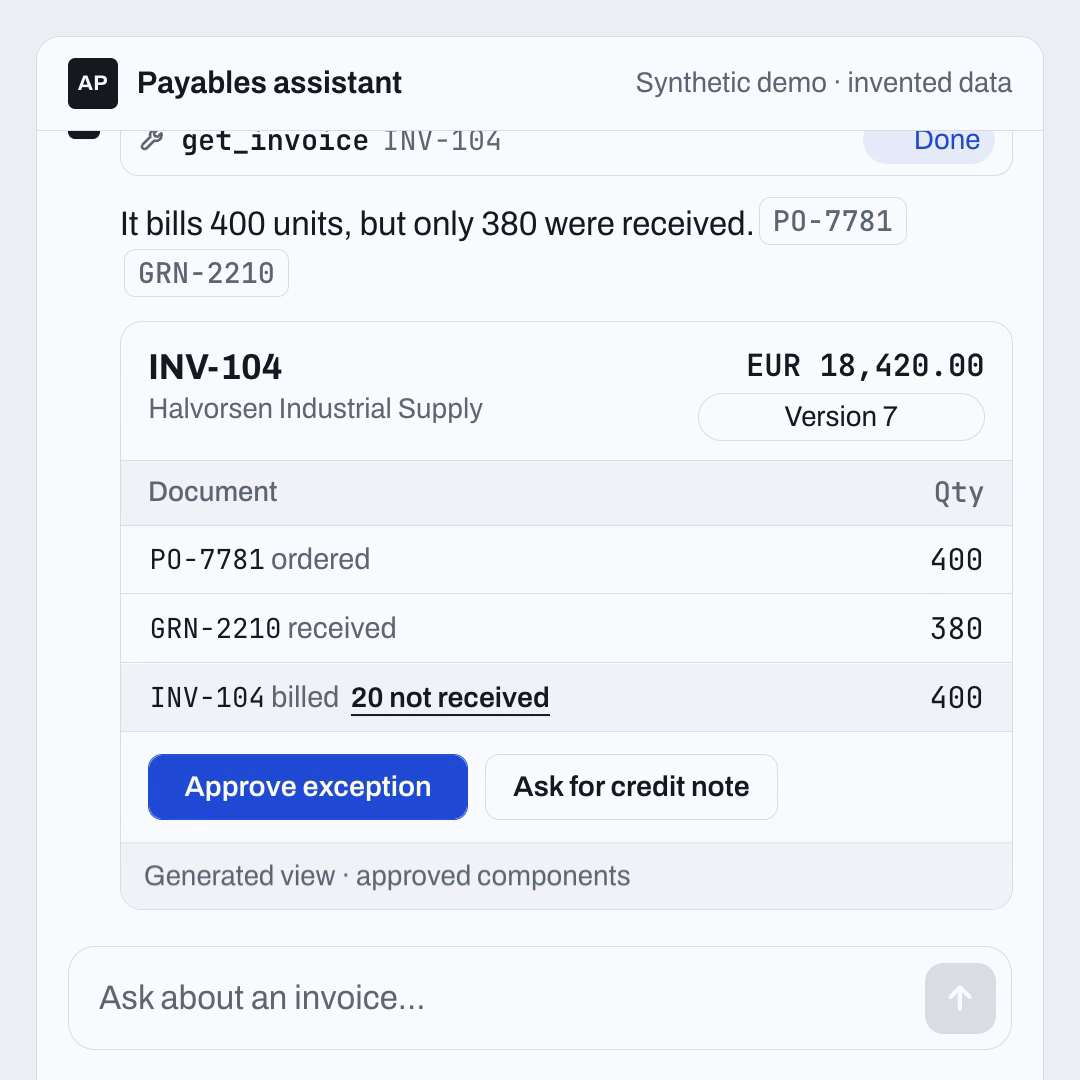
An accounts payable reviewer types a question into a payables assistant: "Why is INV-104 blocked?" A text answer would say the invoice bills 400 units, only 380 were received against the purchase order, and someone should probably decide what to do about the other 20. Generative UI asks a different question. What if the answer arrived as something the reviewer could actually work with?
Generative UI is a pattern in which an AI model answers with an interface instead of only text, by describing how to assemble components from an approved catalog that ordinary application code then renders. It matters because the answer becomes something a person can act on, which moves the model into the path of real business operations. It differs from AI-generated code because the model chooses and fills known components rather than writing new executable software.
Here is what that looks like in a short demo made for this piece. The data is synthetic and there is no real backend behind it.
Silent 28 second demo with invented data. The reviewer asks why INV-104 is blocked. The assistant answers with a generated invoice view showing 400 ordered, 380 received and 400 billed. The reviewer clicks Approve exception. The server checks identity and permission, both pass, then finds the view was built on version 7 while the record is now version 8. The call stops, nothing is approved, and the assistant shows a version 8 diff with a Review version 8 button. You can also try the interactive version and click the buttons yourself.
The answer has a table, two source chips and two buttons. That is pleasant. The interesting part starts when the reviewer presses one of those buttons, because at that moment you are no longer designing a nicer chat reply. You are designing a system through which someone can change the business.
The interface has become part of the decision.
That is the opportunity in Generative UI, and also the reason a good-looking demo tells an enterprise team so little about whether it should deploy one.
Table of Contents#
- What does the model actually generate in Generative UI?
- When does a useful answer need a screen?
- What should happen when someone clicks a generated button?
- Where do OpenUI and json-render fit?
- Which benchmark question is worth asking?
- How do you start without rebuilding your application?
- What should you measure before calling it better?
- What should teams building in the UAE test first?
- Where could Generative UI go through 2027?
- FAQ
What does the model actually generate in Generative UI?#
The phrase Generative UI covers several different things. An AI coding agent writing a React application is one. An assistant selecting a predefined chart is another. A runtime assembling an interactive interface from a controlled library is a third. Confusing them makes the technology sound either more dangerous or more ordinary than it is.
This article is about the third case.
The application supplies a catalog of components the model can request. A component might be a comparison table, an evidence panel, a date selector or an action button. The model produces a description of how to assemble those components. A renderer, which is ordinary application code, turns that description into the interface the user sees.
The catalog is a vocabulary. It says which interface elements exist and what information each one accepts. A table may require named columns and rows. An evidence panel may require document identifiers. An action button may accept an application-defined action identifier, like approve_invoice, and nothing else.
That is a more bounded task than asking a model to invent arbitrary executable code for every response. It still leaves room for mistakes. A perfectly valid table can contain the wrong invoice amount. A valid button can refer to a transaction the user should never have seen.
In the architecture I am proposing here, validation happens in layers. First, can the description be parsed? Then, are these components and properties allowed? Finally, does the information belong to this user and this business operation? Each question has a different owner. A renderer can help with the first two. The application has to answer the last one.
This also clarifies where the language model belongs. It can propose a useful arrangement of approved information. It does not have to own every sort, filter or button click. Once the interface exists, ordinary software can handle those interactions.
When does a useful answer need a screen?#
Text is excellent when someone wants an explanation. It gets awkward when they need to compare options, inspect exceptions or change a small number of fields before acting.
Consider three supplier invoices. One is blocked by a missing document. One exceeds an approval threshold. One does not match the purchase order. A paragraph can describe all three. A comparison view can make the differences easier to inspect, provided it includes the evidence and does not hide the exception behind a reassuring color.
The potential benefit is less translation work for the person. They do not have to copy an identifier out of chat, open another application, find the same record and reconstruct the context before making a decision. That benefit needs to be measured. It should not be assumed because the response contains a table.
There is a cost on the other side. People learn interfaces by finding things in the same place. If every request produces a different arrangement, the user may spend more time understanding the screen than they would have spent using a familiar form.
So a sensible design keeps some things stable. Evidence should appear predictably. The meaning of an approval button should not change between responses. Critical warnings need a consistent position and accessible presentation. The generated part can adapt the information and the relevant controls around those anchors.
This is where a design system becomes more than a collection of visual styles. It gives the model a limited set of useful choices and gives the person a familiar way to read the result.
For a task that already works well as a fixed form, a fixed form may remain the better product. Generating a new screen for a standard address change adds uncertainty without necessarily removing any work.
What should happen when someone clicks a generated button?#
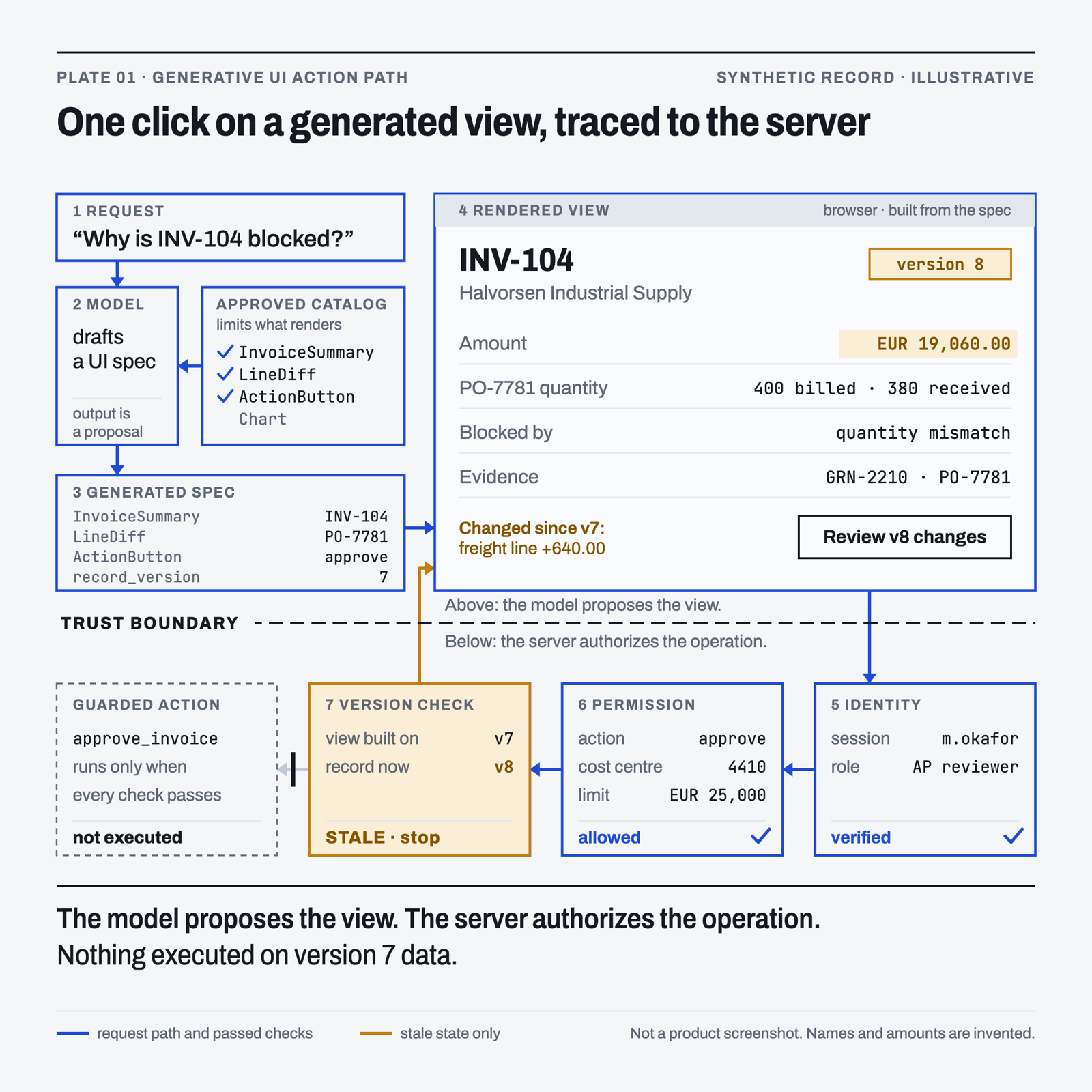
A click on a generated button should send a typed request to the server and nothing more. The server then decides, using its own records, whether that operation can run for this person right now. In the demo, Approve exception sends approve_invoice for INV-104 along with the record version the view was built on, which is version 7. The server checks three things in order. Identity comes from the session, not from anything the model wrote. Permission comes from the approval policy, here up to EUR 25,000 in cost centre 4410. Version compares the record the person saw with the record that exists now. The first two pass. The third fails, because a supplier portal changed the invoice at 10:42 and it is now version 8 with a new freight line. So the call stops, the button shows Outdated, and the assistant says plainly that nothing was approved. The person then reviews version 8 and makes a new decision.
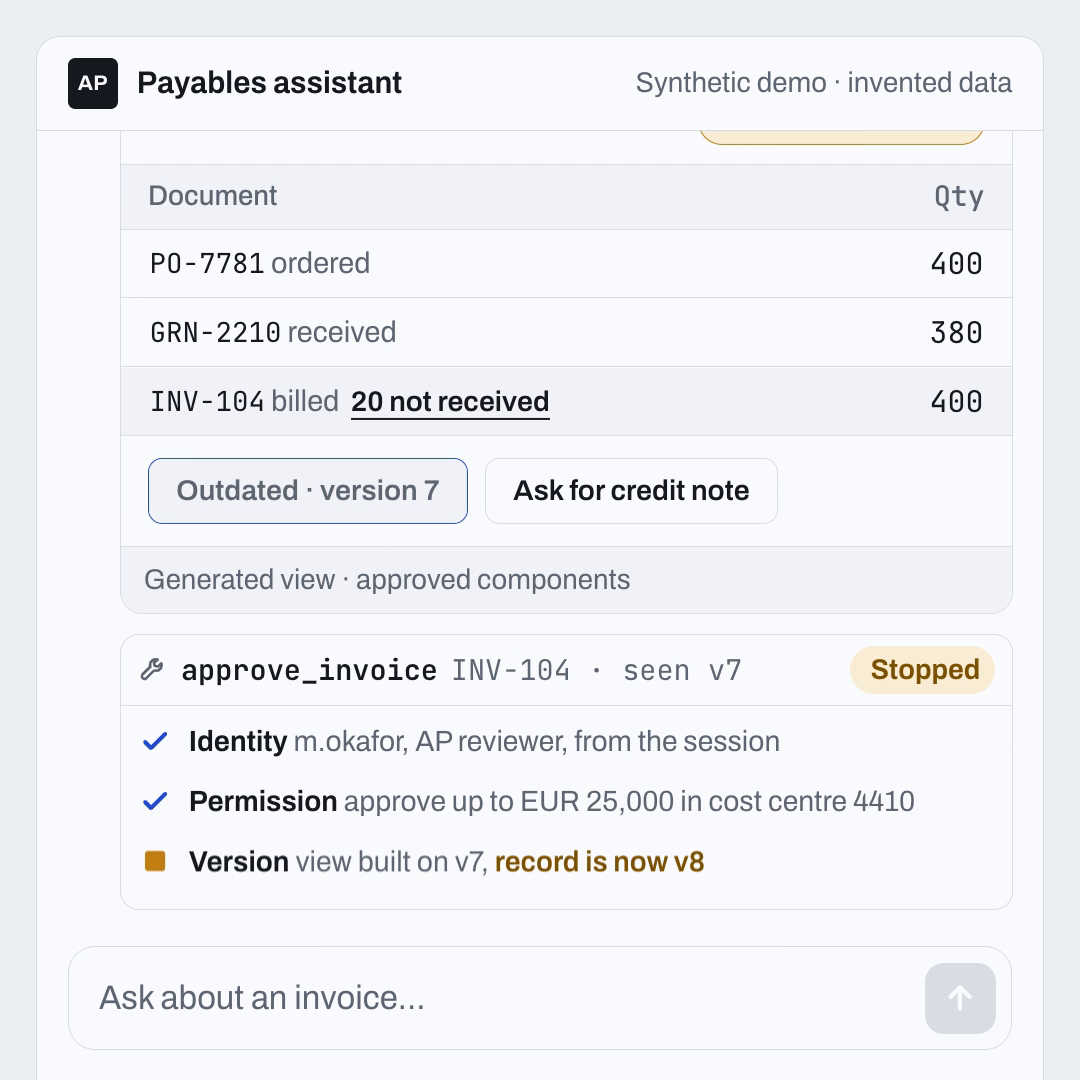
None of this is a feature of a rendering framework. It is a proposed application design, and the demo is a simulation of it. Here is how the three checks line up:
| Check | What the server compares | Result in the demo |
|---|---|---|
| Identity | The session user against the person allowed to act | Passed: m.okafor, AP reviewer |
| Permission | The action and amount against the approval policy | Passed: approve up to EUR 25,000 in cost centre 4410 |
| Version | The record version the view was built on against the current record | Stopped: view built on v7, record is now v8 |
The version check is the one most demos leave out, and I think it is the most important one for generated views. A generated screen is a snapshot. It was correct at the moment the model and renderer produced it. Between that moment and the click, someone else can change the record. If the button simply carries "approve INV-104", the person approves something they never saw.
Binding the request to the record version fixes that. It also changes what the interface is allowed to say afterwards. The approve button in the demo never turns into a success state. It goes from Approve exception to Checking to Outdated. An optimistic animation should not claim completion before the application knows what happened.
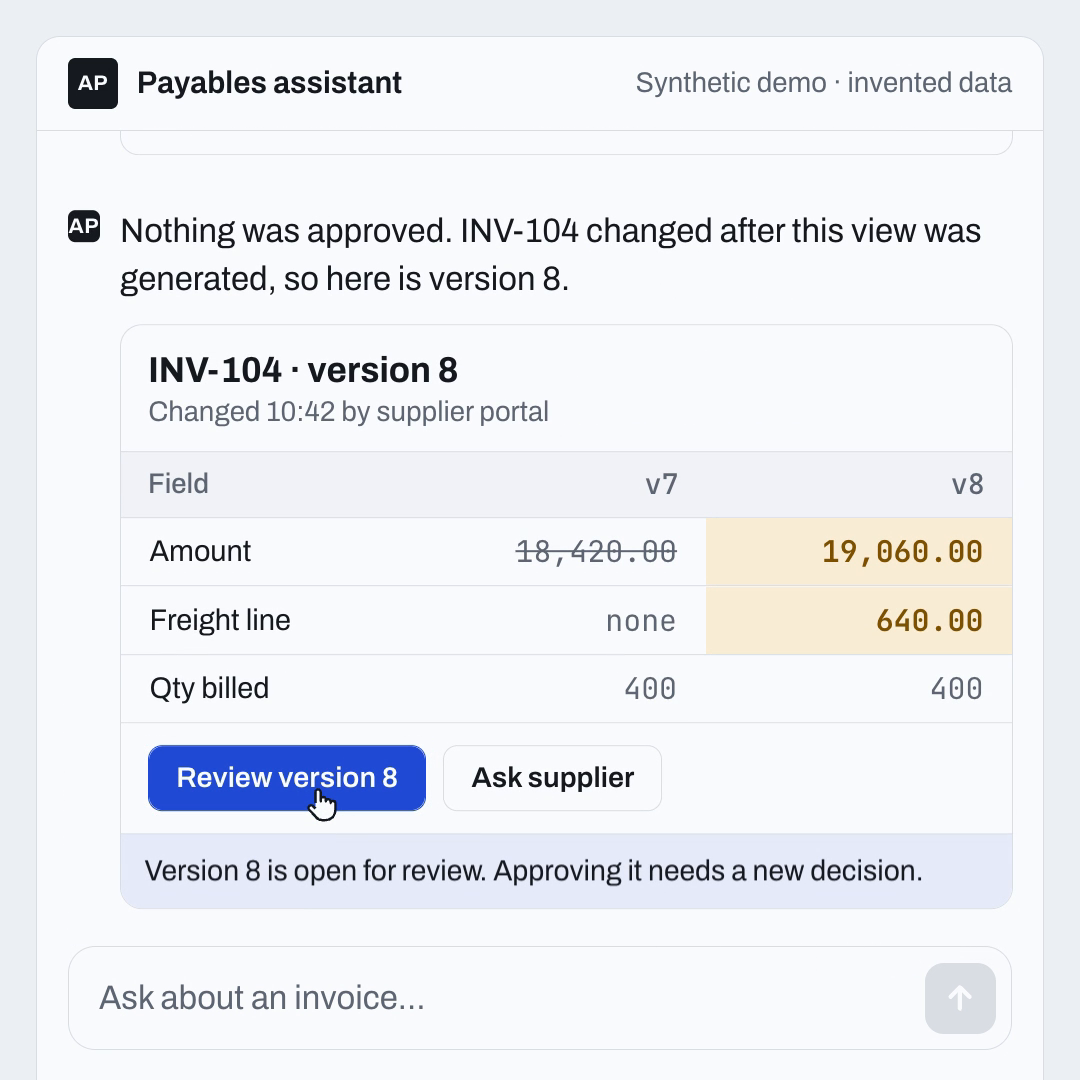
The recovery matters as much as the stop. A bare error would leave the reviewer guessing. The demo instead shows what changed between version 7 and version 8 and offers Review version 8 or Ask supplier. Approving version 8 is a new decision with its own checks.
A few more rules belong in the same design even though the demo does not show them. The backend should decide which records a person can see before anything reaches the model. Sending everything to the model and hiding rows afterward has already exposed the information to the generation path. Execution needs its own identity, such as an idempotency key, so the backend can recognize a retry. If a request times out after a downstream service accepted it, the application should reconcile the outcome rather than blindly send another copy.
The same separation shows up in why agents fail when their context is poorly managed. Better presentation cannot compensate for retrieving the wrong evidence or carrying an obsolete assumption into the next step. And the question of who is allowed to approve what, and with how much evidence, is the subject of my piece on blast radius tiers for agent permissions.
For readers who prefer a diagram, here is the same path drawn as a systems plate. It was an earlier version of the animation and I kept it as a secondary reference.
Where do OpenUI and json-render fit?#
Chris Tate's announcement of @json-render/chat is interesting because of where the interface appears. The package brings generated cards into existing chat platforms. The json-render v0.22.0 release notes describe one catalog that posts natively on Slack, Teams and the other Chat SDK platforms, a streamCard function that edits a card in a thread as elements arrive, and a toCard function that validates specs against per-component schemas and optional platform limits. That makes native chat cards a concrete adoption path.
OpenUI takes a different route. According to the OpenUI framework comparison, it uses a compact, line-based language designed for models to generate interfaces from registered components, and its runtime supports streamed rendering, application state, data access and user interactions. These are overlapping ambitions, expressed through different representations and runtime choices.
There is a tempting shortcut here. JSON means verbose but familiar, a purpose-built language means compact and fast, therefore one is better. That skips the application you are trying to build.
A team whose workflow already lives in Teams has a different first question from a team building a custom operations workspace. The former needs to understand card capabilities, event handling and platform limitations. The latter needs to understand component integration, interaction state and how the generated surface fits the rest of its application.
The json-render repository also documents web renderers, state and actions. Interactivity is not an exclusive OpenUI category. Equally, a shared catalog does not mean every destination will display every component identically. The catalog and the renderer still need to fit the target surface.
Neither framework does the version check from the demo for you. That lives in your backend.
Here is the comparison I would use to structure an evaluation:
| Situation | What to investigate | Baseline to include |
|---|---|---|
| The workflow lives in Slack or Teams | json-render's Chat SDK path against the actual cards, limits and actions required | The current message or bot flow |
| The workflow needs a custom interactive workspace | OpenUI and json-render with your own components and interaction requirements | An existing fixed screen for the same task |
| Output generation is a significant cost | Both formats on the same tasks, including prompts, retries and repairs | Token and latency numbers from your own runs |
| The task has a stable, known sequence | Whether generation removes any real work | A conventional form or dashboard |
| Actions change enterprise records | Backend authorization, version checks and execution, separately from either renderer | Your current approval path |
These are starting points for a test, not a procurement verdict. The best renderer for an attractive prototype may not be the best fit for the workflow your users repeat every day.
Which benchmark question is worth asking?#
OpenUI's token benchmark covers seven scenarios, in which OpenUI Lang totals 4,800 tokens against 10,180 for the compared json-render representation. The methodology matters. The page says each format is derived from the same model output rather than independently generated, so OpenUI Lang is produced first and then converted into the other formats. The latency estimates assume a constant 60 tokens per second. They are not measured application response times.
That is evidence about representation size under a particular setup. It is not enough to establish what happens when your chosen model independently generates each format, your retrieval calls run, validation fails, and the user clicks a control.
Structural validity deserves the same care. Being able to parse and render a response is necessary. It does not prove that the response used the correct records, displayed an accurate total or enabled the right action for the current person. OpenUI's own production guidance says models can use unknown components, supply invalid properties, leave references unresolved or stop before completing a response, and that provider outages can interrupt generation. Applications have to handle all of that.
For an enterprise pilot, I would separate three measurements. Does a screen render? Does it present correct information? Can a user complete the intended task safely? A framework can do well on the first while your application does poorly on the other two. The demo above would pass the first two and still be dangerous without the version check.
That makes a benchmark less convenient to put in a headline. It also makes it much more useful to the person deciding what to deploy.
How do you start without rebuilding your application?#
Start with a single decision that is currently difficult to inspect. A useful candidate has variable evidence, a small number of meaningful actions, and a person who can tell you whether the interface helped. Avoid choosing the broadest workflow simply because it produces the most impressive demo.
For the first version, keep the surface read-only. Present a comparison or an exception summary using synthetic data or approved test records. Use the same underlying facts in a conventional interface and a generated interface. Ask users to perform the same task in both. Watch where they hesitate, which evidence they inspect and what they misunderstand.
Then define a small component catalog. A summary, an evidence list, a comparison table and a fixed detail panel may be enough. Each extra component increases the number of combinations you must understand. Large catalogs should earn their complexity through real requirements.
Keep authoritative values outside free-form model invention. If an invoice total is already available from the source system, bind the display to that value. There is no benefit in asking the model to reconstruct it from a paragraph. Where the model produces an interpretation, label it as an interpretation and keep the evidence nearby, the way the demo keeps PO-7781 and GRN-2210 next to the answer.
Introduce one action after the read-only version is useful. Asking a supplier for a credit note is easier to reason about than releasing a payment. That does not make it harmless. It still needs permissions, a valid target, a version check and an audit record. It simply narrows the consequences while you learn.
Keep a conventional fallback throughout the pilot. A malformed response, unavailable model or unsupported client should not strand a user halfway through their work. A fixed detail page can be less elegant and still be the most important screen in the system.
Also test the interface with a keyboard and assistive technology. Streaming content should not keep moving focus or change the meaning of a control while someone is trying to use it. A component being approved for the catalog does not establish that every generated arrangement is usable.
Only after this loop should you broaden the action set or introduce another delivery channel. Each platform adds its own rendering constraints and interaction behavior. Portability is something to demonstrate against your requirements, not something to infer from a package list.
What should you measure before calling it better?#
The obvious measurements are output tokens and time until the first component appears. Both matter. Neither captures the whole task.
Measure time until the interface is usable, including retrieval and validation. Then measure time until the person makes a correct decision. A screen that appears quickly but requires three corrections can be slower than a fixed page.
Track repair attempts and fallback frequency. Count abandoned tasks. Record incorrect or missing evidence references. For actions, separate permission denials, stale-version stops, downstream failures and uncertain outcomes. Those categories need different fixes. Folding them into one "agent error" number makes the next engineering decision harder.
A practical pilot scorecard might look like this:
| Measure | What it helps decide | How to count it |
|---|---|---|
| Correct task completion | Whether the interface helps the user reach the intended result | Tasks completed with the right outcome, checked against the source record |
| Time to a usable view | Whether generation and recovery fit the workflow's patience budget | Request to first interactive control, including retrieval and validation |
| Evidence comprehension | Whether people understand the basis for the decision | Short follow-up question after the task |
| Repair and fallback rate | Whether the generated path is dependable enough for repeated use | Responses repaired or replaced by the fixed view |
| Stale or unauthorized actions stopped | Whether application controls hold under mistaken and adversarial requests | Version conflicts and permission denials, logged separately |
| Cost per completed task | Whether savings survive retries, infrastructure and human correction | Model, retrieval, repair and review time divided by correct completions |
Define these measures before comparing frameworks. Otherwise it is easy to select the one that wins the metric its own demo made most visible.
For cost, include model input and output, retrieval, validation or repair calls, platform infrastructure and the time people spend correcting mistakes. There may be a real token saving. There may also be a much larger integration bill. Both can be true.
Reliability compounds across steps, which is why multi-agent chain reliability is relevant even when the user sees only one card. A good pre-launch test set will not catch every production pattern either, so the distinction between offline and online evaluations matters here too.
What should teams building in the UAE test first?#
Teams in the UAE should test the workflow and the people using it before they test any framework. A technology label is not a business case. A procurement exception, an operations incident or a service request can make the value easier to test than a general promise of a more intelligent dashboard. I would put four questions into a locally relevant brief. First, does the actual user population need Arabic and English? If so, test right-to-left layout, mixed-language identifiers like invoice numbers, and consistent meanings for actions, because translating labels alone will not show that an approval flow is understandable. Second, which systems and channels already carry the work, since a Teams card and a dedicated workspace suit different tasks. Third, where does each part of the data travel, including model calls, telemetry, logs and repair services? Fourth, who owns the component catalog, the action contracts and the failure investigations after the pilot ends?
Most of these questions apply to enterprises anywhere. Arabic and English interaction is a locally relevant test when the actual user population needs both, not an assumption about every UAE organization. Applicable contractual and regulatory requirements need their own assessment. Choosing a renderer does not settle them.
The regional opportunity is to make the technology useful under a specific organization's constraints and to show the evidence that it worked.
Where could Generative UI go through 2027?#
My working hypothesis is that generated interfaces will become useful as temporary views around persistent business records. The view may change with the question. The invoice, incident, approval history and access policy should stay stable.
That would let a person ask for a comparison, inspect an exception and request a review without navigating several separate screens. It would also require careful boundaries. The generated view cannot become the only place where the business state exists.
A second possibility is that component catalogs grow into richer contracts. An evidence panel might carry freshness and provenance requirements. An action control might carry confirmation rules and an expected record version, which is exactly what the demo's approve button needed. The visual component would stay simple, while the application defines what it is permitted to represent or request. This is a design direction, not a claim that today's frameworks standardize those responsibilities.
Cross-surface delivery is another area to watch. A short update in chat and a detailed review in a web workspace could share the same underlying operation while presenting different amounts of information. The goal would be continuity of evidence and action state, with each surface using a suitable layout.
There are reasons these predictions might develop slowly. Fixed interfaces are easier to learn. Accessibility gets harder when layouts vary. Repair adds latency. Some organizations may find that a few well-designed templates deliver most of the benefit with much less uncertainty.
That would be a useful result, not a disappointing pilot. The point of the experiment is to find a better way to do the work.
The next convincing demonstration should therefore include the moment after the attractive screen appears. Show an expired permission. Change the underlying record. Interrupt the action response. Then show the person what happened and how they recover. The demo above simulates the second of those, and only the second.
That is where a generated interface starts to earn its place in an enterprise application.
FAQ#
What is Generative UI?#
Generative UI describes interfaces whose content or structure is produced by AI. In the approach discussed here, a model describes an interface using approved components, and application code renders it. This differs from letting generated code execute freely inside a production application.
Is OpenUI better than json-render?#
There is no universal answer. OpenUI's compact language and runtime are worth evaluating for interactive experiences. json-render's documented renderers and Chat SDK integration offer other adoption paths. Compare the actual workflow, components, models and recovery behavior you need. Vendor benchmarks help form hypotheses, and they do not replace that test.
Can Generative UI work inside Microsoft Teams or Slack?#
The json-render v0.22.0 release describes one catalog posting natively on Slack, Teams and other Chat SDK platforms. Validate the specific components, platform limits, event handling and update behavior your workflow requires. Sharing a catalog does not guarantee identical capabilities or presentation on every destination.
Does a safe component catalog make an enterprise agent secure?#
No. A catalog limits the interface vocabulary. It does not establish data access, factual correctness or permission to execute an action. The backend still needs identity checks, authorization, input validation, record version checks and audit evidence. Those responsibilities remain even when every generated component is valid.
What should happen if the record changes after the view is generated?#
The action should stop. Bind each request to the record version the person saw, compare it with the current version on the server, and refuse to execute on a mismatch. Then show the person what changed and let them make a new decision on the current version.
What should an enterprise measure during a pilot?#
Measure correct task completion, time to a usable interface, repair and fallback frequency, evidence quality, stale or unauthorized actions stopped, and total cost per completed task. Include accessibility and permission-change cases. Output-token savings alone cannot tell you whether the workflow improved.